AI Policies
That Don’t
Expire.
Practical AI governance for district leaders
mguhlin.org
A district can write a responsible AI policy today and still find parts of its guidance out of date six months from now. I think the response is to keep our values steady while improving how we act on those values. This session is about giving school leaders a practical way to do both. We will look at the policies that should endure, the procedures that need to change, and the evidence that tells us whether new tools are helping. I will also show how six frameworks fit together without turning them into six more forms everyone has to fill out.
About the Facilitator
J. Miguel Guhlin
Director of Professional Development · TCEA
- 30+ years in K–12 teaching and technology leadership
- Professional learning in high-effect size instructional strategies
- Creator of ACE: Articulate, Connect, Extend
- Developer of SHINE and PROTECT for responsible AI use

I'm Miguel Guhlin, Director of Professional Development at TCEA. For over thirty years, I've worked in K–12 teaching, district technology leadership, and professional learning. My work connects high-effect size instructional strategies with evidence-informed learning and responsible AI use. I developed ACE, Articulate, Connect, Extend, to help educators make student thinking visible and look beyond a polished product. ACE connects with SOLO and the progression from surface to deep to transfer learning. SHINE and PROTECT address the complementary questions of classroom fit, privacy, safety, and governance. Together, these tools keep today's conversation focused on what students understand and what schools can responsibly support.
Biography: Miguel Guhlin · About · Curriculum vitae and ACE framework · TCEA author photo
Guidelines spread. Capabilities change.
A policy written for chatbots may be tested by agents and embedded AI.
CoSN, 2026
CoSN, 2026
What happens when a familiar vendor adds an unfamiliar capability?
CoSN's 2026 State of EdTech findings report that 79 percent of surveyed districts have AI guidelines, while 56 percent have policies for acceptable use of generative AI. Those are different measures. Guidance is spreading, but having a document does not tell us whether it accounts for new capabilities. A familiar software product may add a feature that summarizes conversations, retrieves records, or sends a message. We need a process that notices those changes. As we go, keep one recently approved product in mind and consider what would happen if its capabilities changed overnight.
Source for this slide: https://www.cosn.org/purposeful-edtech/
Three layers. Every framework has a home.
Keep the values. Change the playbook. Each tool in this deck lives in exactly one layer — so you always know which drawer to open.
Foundational policy
Privacy · Safety · Academic Integrity · Accessibility · Human Judgment
Operational guidance
Home for SHINE · PROTECT · the Agentic Use Check — vendor reviews, permissions, approved features
Classroom practice
Home for Visible Learning · SOLO · ACE — assignment expectations and learning checks
I recommend separating district governance into three layers. The first is enduring policy: our commitments to privacy, safety, academic integrity, accessibility, and human oversight. The second is operational guidance, where vendor reviews, approval criteria, permissions, and procedures live. The third is classroom guidance that teachers and students can use. These layers change at different speeds. A quarterly operational review is a suggested cadence, not a legal requirement. Major changes should trigger a review sooner. Treat this slide as the map for the rest of the session. Every framework that follows has one home: SHINE, PROTECT, and the Agentic Use Check belong to Layer 2, where we evaluate tools and vendors; Visible Learning, SOLO, and ACE belong to Layer 3, where we check student learning. If you are planning a lesson, you can ignore the Layer 2 tools; if you are reviewing a vendor, you can ignore the Layer 3 tools. The point is not six more forms to fill out. It is one architecture that tells you which questions apply right now. TeachAI makes a similar distinction between established policies and more flexible guidance, while recognizing that district processes and legal review still matter.
Source for this slide: https://www.teachai.org/teachai-ai-guidance-for-schools-toolkit
The three layers, on a single page.
The whole governance model at a glance — values that outlast updates, the tools that review change, and the checks that keep learning honest.
- Layer 1 — Privacy, safety, integrity, accessibility, human judgment
- Layer 2 — SHINE · PROTECT · the Agentic Use Check
- Layer 3 — Visible Learning · SOLO · ACE
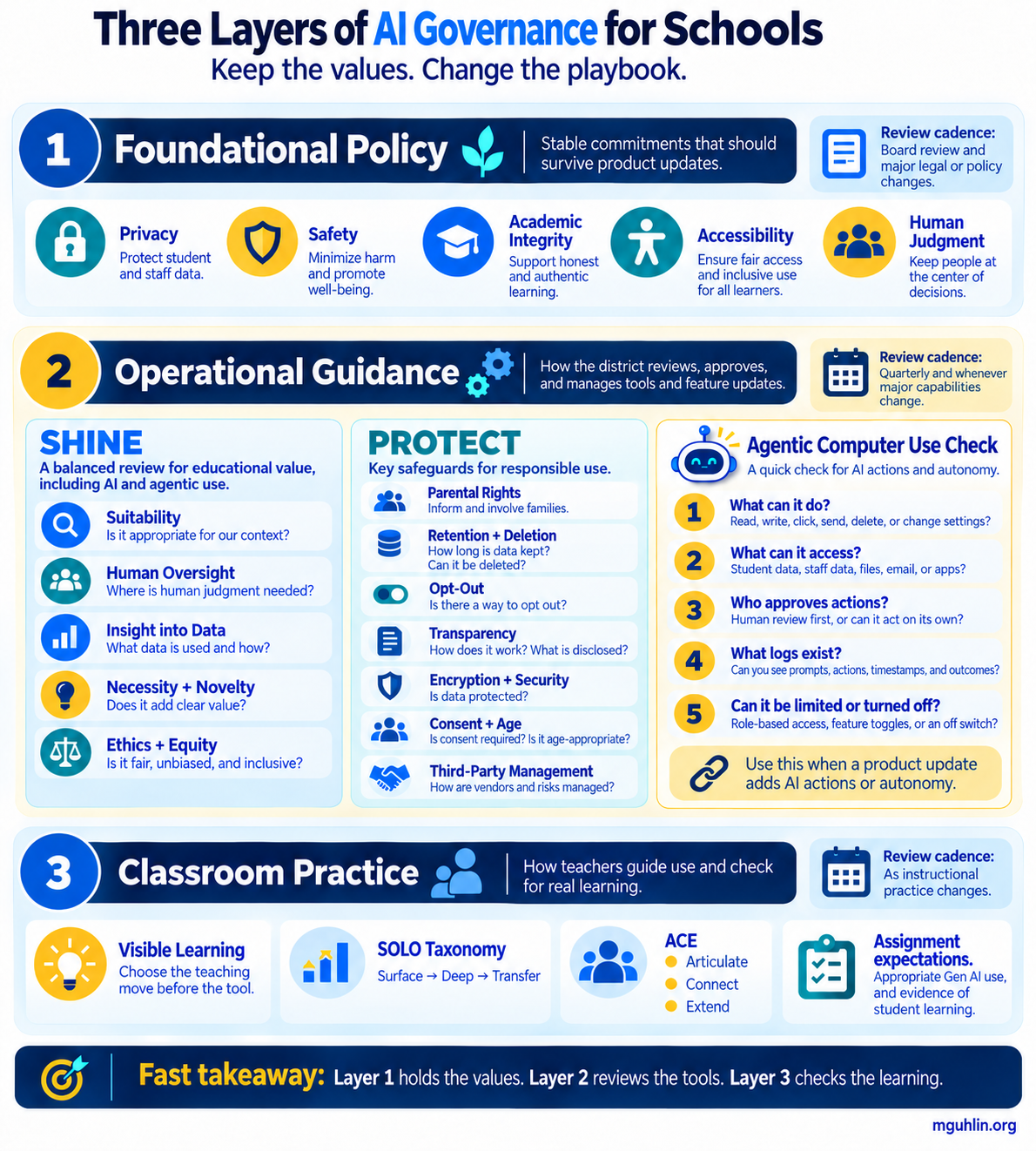
This is the same three-layer architecture as the previous slide, drawn as a one-page reference you can share with a board, a cabinet, or a campus leadership team. "Keep the values. Change the playbook." Layer 1 holds the foundational commitments and changes only on board review or a major legal shift. Layer 2 is where SHINE, PROTECT, and the Agentic Computer Use Check live, reviewed quarterly and whenever capabilities change. Layer 3 is classroom practice — Visible Learning, SOLO, and ACE — updated as instruction evolves. If you take one image away from today, take this one: it tells anyone in the district which questions apply to their role without reading the whole policy.
Know your phase before moving ahead.
The Five Phases describe progress across policy, accounts, guidance, curriculum, and outreach.
Look across five dimensions
Policy, account management, district guidance, curriculum integration, and community outreach.
Find the next decision
What capability or safeguard needs to improve before we broaden use?
A later phase is not a license to skip privacy or instructional evaluation.
The Five Phases of School AI Adoption from TCEA provide a language for describing where a district stands. The phases are AI Secured, AI Exploration, AI Pilot Programs, AI Unification, and AI Everywhere. The original model also describes five categories: district policy, account management, guidance, curriculum integration, and community outreach. A district may be in different places on different dimensions. The aim is not to race toward AI Everywhere or to approve every new tool. The aim is to understand what the organization can currently support, what safeguards are missing, and which next step has the most educational value.
Source for this slide: https://blog.tcea.org/responsible-ai-adoption/
Give people room to solve problems.
One of the things Gen AI changes is how quickly a small group can test an idea. I have sat in meetings where we are still discussing whether to solve a problem while someone has already built a rough prototype. That energy can be useful in schools, but it needs thoughtful limits. We cannot experiment with actual student records in unapproved systems, and a prototype is not the same as a district-ready product. Within those boundaries, though, teachers and instructional coaches should be able to investigate real instructional problems and bring evidence back to district leaders. That is the next part of the conversation.
Meet Ms. Rivera. We follow her all session.
A seventh-grade English teacher needs faster, more useful feedback for 150 writers. One teacher, one problem — carried through every framework ahead.
Define the need
Timely, actionable feedback for 150 writers.
Test safely
Use fictional essays in a district-approved system.
Compare quality
Check AI suggestions against teacher feedback.
Vet the tool with SHINE · clear it with PROTECT · use it with students via ACE. Procurement to final grade, one thread.
Let teachers try. Keep students protected. Judge the evidence.
Meet Ms. Rivera, a seventh-grade English teacher responsible for reading roughly 150 essays. I am going to keep her on stage for the rest of the session, because the biggest risk in a talk like this is handing you six frameworks with a new character in each one. Instead we follow one teacher from the moment she finds a tool to the moment she grades a student. Ms. Rivera and an instructional coach wonder whether an approved AI assistant could suggest useful next-step feedback. Rather than rushing into live student submissions, they test the idea with fictional essays and compare the output with their own professional feedback. They look for inaccuracies, generic comments, time saved, and whether the suggestions would help students revise. A district leader can support that kind of trial with a narrow purpose and clear boundaries. The point is to learn what works before expanding access or changing classroom procedures.
Bring evidence to the quarterly meeting.
Ms. Rivera's team tried three ways to speed up writing feedback. One earns a second test.
Fast, inaccurate
Feedback misreads the rubric; too much to correct.
Accurate, costly
Good comments, but setup eats her planning period.
Useful, testable
She can verify and adapt the suggestions quickly.
What improved? For whom? At what cost? What new risks appeared?
When I talk about reviews, I do not mean asking whether we should add another paragraph to the handbook. I want to see what educators tried. Suppose Ms. Rivera and two colleagues each test a different way to speed up writing feedback. One method is fast but misreads the rubric. Another is reliable but adds so much setup that it eats the planning period. A third helps her get to usable feedback that she can verify quickly. The third may merit a supervised expansion. The others are not failures to hide; they tell us where not to invest more effort. Quarterly is a useful starting point, but the evidence and the risks should determine the next decision.
Run every promising tool through SHINE.
Review classroom fit, human approval, connected data, and net benefit.
She runs her shortlisted feedback tool through SHINE before she asks IT to review it. Under Human Oversight and Approval she asks: does a human review each message before it sends, or only after?
SHINE v3.0 is our classroom review framework for AI tools and computer use agents. I start with Suitability and Scope: does the tool fit the learning goal, age, task, and risk, and what should it be allowed to do? Human Oversight and Approval keeps a teacher or administrator in the loop before high-impact or autonomous actions, with monitoring and override controls. Insight into Data and Integrations makes connected apps, permissions, prompts, logs, retention, and model-training practices visible. Necessity, Novelty and Net Benefit asks whether the improvement outweighs complexity and risk. Ethics, Equity and Safety covers accessibility, bias, privacy, academic integrity, and student independence. Ms. Rivera uses SHINE for classroom fit, then partners with district staff on PROTECT for privacy, governance, and rollout decisions.
Source for this slide: https://blog.tcea.org/shine-lighting-the-way-to-responsible-ai-adoption/
SHINE v3.0 rubric
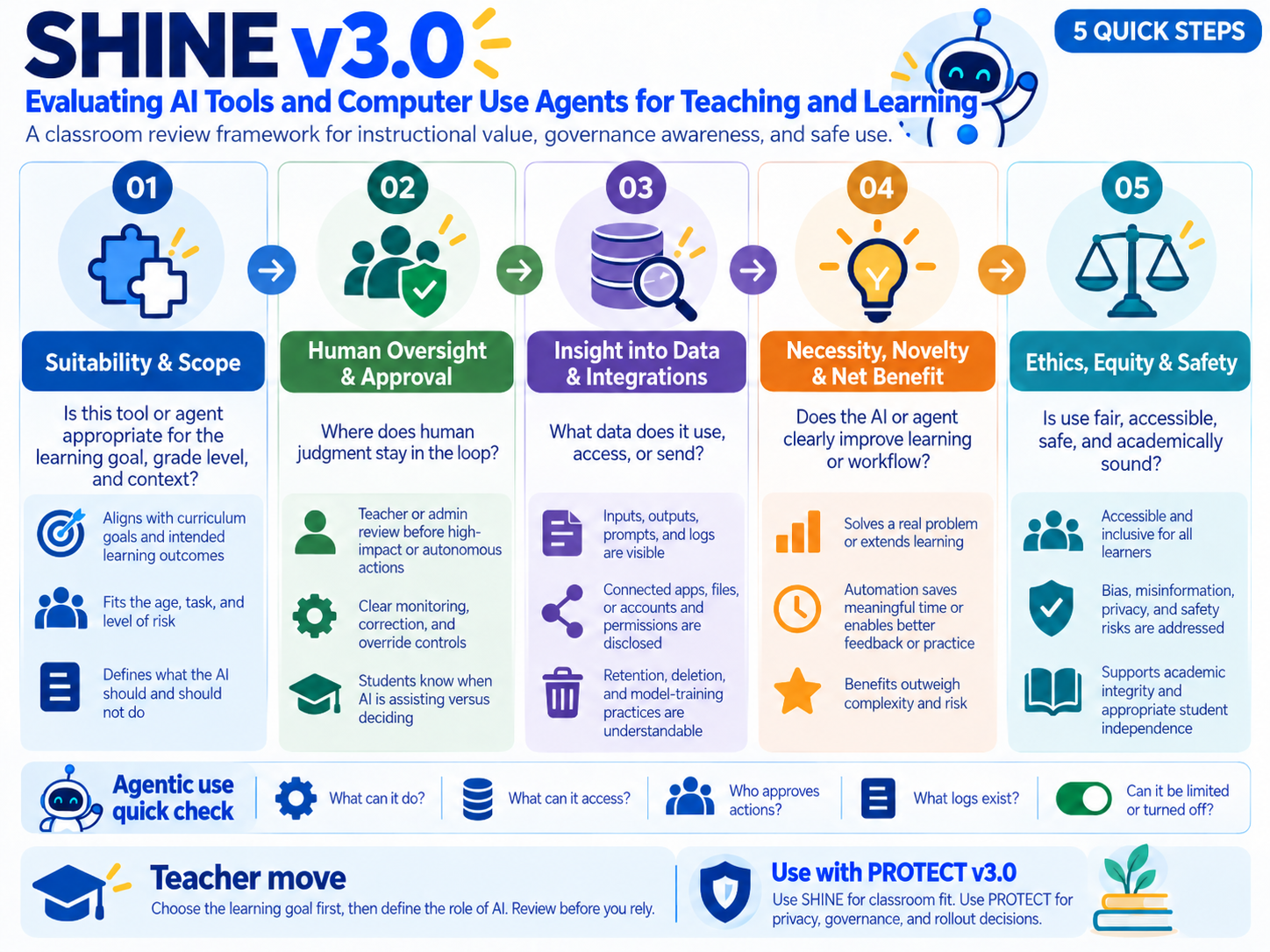
Here is the revised SHINE one-pager, with all five review steps visible together. I choose the learning goal first, then define the role of AI. As I review a tool, I look across scope, human approval, integrations, net benefit, and safety rather than treating a strong demo as enough evidence. The agentic quick check along the bottom helps me ask what it can do, what it can access, who approves actions, what logs exist, and whether it can be limited or turned off. You can select the image to open the original resolution for closer reading. Next, PROTECT takes us from classroom fit to privacy, governance, and rollout decisions.
PROTECT students before approving tools.
Review student privacy, AI governance, and agentic computer use.
District IT runs her tool through PROTECT before approving it. Encryption alone is not enough: under Transparency, Traceability and Logs, IT requires an action audit log — what the AI did, when, and on whose authority.
PROTECT v3.0 extends our privacy review to AI governance and agentic computer use. Its seven categories cover permissions and parental access; retention, deletion, and data use; oversight, opt-out, and off-switches; transparency, traceability, and logs; encryption, security, and expanded permissions; consent, context, and age-appropriate use; and third-party management and change review. I ask reviewers to examine the actual terms, privacy agreements, and security documentation, then record evidence for each score. Each category earns zero, one, or two points, for a maximum of fourteen. The next slide shows the scoring and interpretation guide. AI-assisted review stays a draft until people confirm it. For Ms. Rivera's tool, IT checks who authorizes actions, what gets logged, whether permissions can be limited, and how to stop the agent before rollout.
Source for this slide: https://blog.tcea.org/student-privacy-shield-tcea-protect/
PROTECT v3.0 rubric
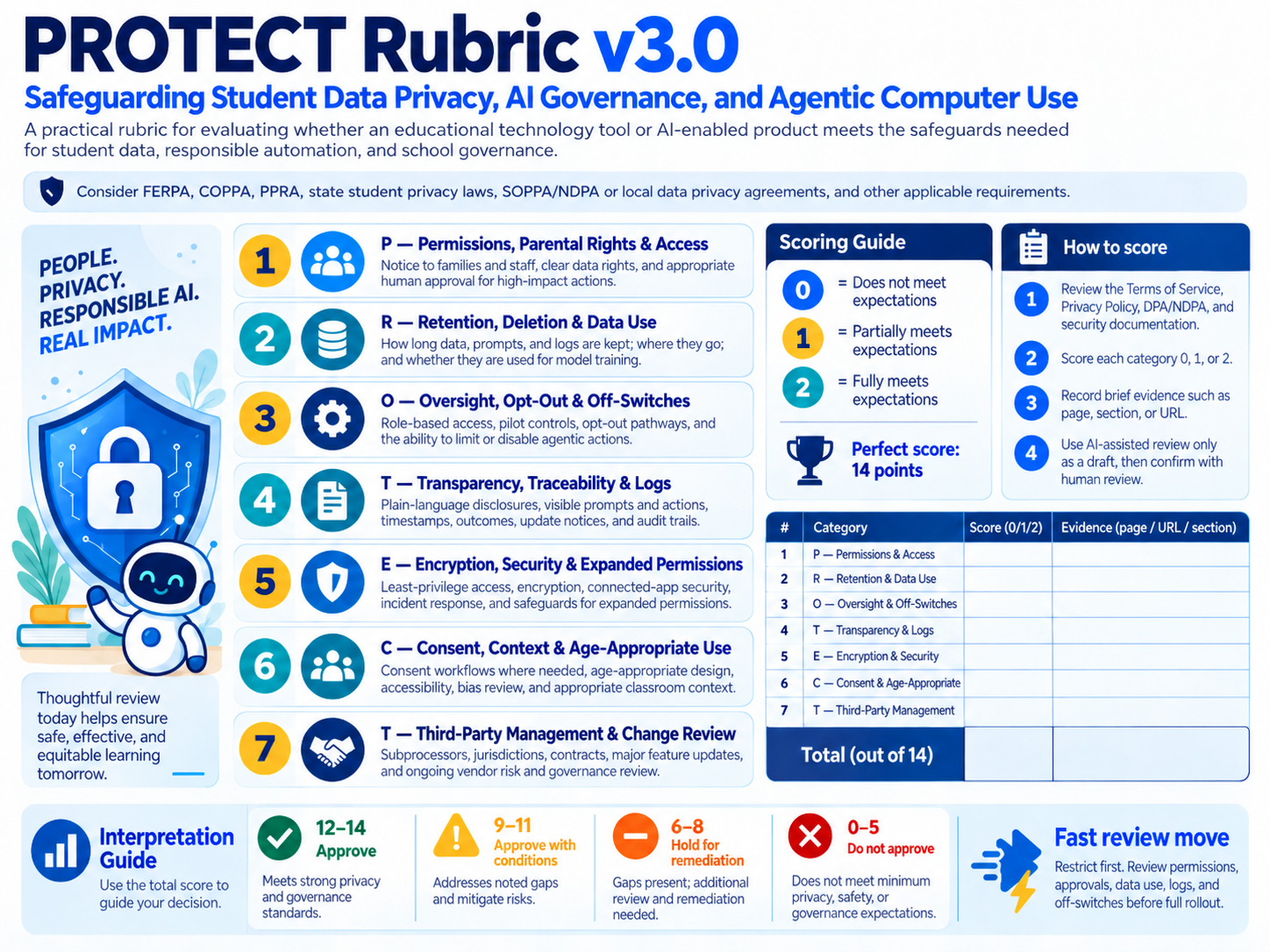
This is the revised PROTECT rubric and its evidence record. I score each of the seven categories zero, one, or two based on the vendor documents and technical controls we can actually verify. Fourteen is the maximum. The interpretation guide suggests approval at twelve to fourteen, approval with conditions at nine to eleven, a hold for remediation at six to eight, and no approval at zero to five. I use that score to guide a decision alongside the documented evidence and required safeguards. An AI-assisted review is only a draft until people confirm it. Select the image for a closer look at full resolution. The fast review move is to restrict first and review before full rollout.
A feature update should trigger a targeted review.
Scenario: An approved LMS introduces AI summaries of student discussion.
Keep the policy
Privacy, transparency, and human oversight still apply.
Update the guidance
Permissions, vendor terms, feature list, and staff instructions.
Your policy should survive a software update. Your guidance should respond to it.
Consider a learning management system the district already uses. A product update introduces AI summaries of students' discussions. The district has already approved the vendor, but not necessarily this capability. The policy commitments to privacy, transparency, safety, and human oversight remain relevant. The operational team needs to examine what student content is used, where it goes, how long it is retained, and whether teachers can disable the feature. The district may update permissions, contracts, procedures, and the approved-feature list. There is no automatic need to rewrite board policy, though a legal or policy gap could still require formal revision.
Start with shared values and real cases.
The question is what supports learning and protects students.
AI explains
Helps a student understand a math concept.
AI completes
Generates the student’s submitted answer.
AI coaches
Asks questions while the student solves it.
Which uses should be encouraged, limited, or disallowed? Why?
A community can have serious differences over AI use and still agree on educational commitments. Some families want more support for students who need it, while others worry about dependence, privacy, and academic integrity. I would put realistic scenarios in front of them instead of asking whether they are for or against AI. Is it acceptable for AI to explain a math concept? To submit an answer? To ask questions as the learner works? Include students, families, educators, and technology staff, and ask them to explain their reasoning. Participation should influence actual guidance, and leaders should explain where safeguards or legal requirements limit the choices.
Keep student learning at the center.
Tools can generate polished assignments and convincing explanations. That makes it especially important to decide what evidence of learning we want from students. A beautiful product is worth examining, but it is not sufficient proof that a student understands a concept. I want to connect three research-informed resources here. Visible Learning helps us think about instructional strategies. SOLO helps us describe the structure of student understanding. ACE offers a short, practical way to ask students to articulate, connect, and extend what they know. These frameworks complement technology reviews. They help us examine the educational outcome after the technical and privacy questions have been addressed.
Professional learning should feed policy.
Coach, test, reflect, improve, and share.
Bring a problem
Students recall facts but struggle to explain concepts.
Improve the lesson
Teacher and coach revise an AI-generated activity.
Share evidence
Examples and cautions improve district guidance.
A policy nobody can apply is a document gathering digital dust.
Professional learning cannot be a one-time demonstration of new chatbot features. Teachers need to examine problems they recognize, test appropriate uses of technology, and share what happened. Imagine a science teacher who receives a polished ecosystems worksheet from a generative AI tool. It is attractive, but almost every question asks for factual recall. With an instructional coach, the teacher redesigns the experience to require explanation and application. The revised lesson becomes a discussion point in professional learning, and the insights inform district classroom guidance. When we do this routinely, professional learning and policy improvement reinforce each other.
Choose a teaching move before an AI tool.
Visible Learning helps examine influences on student outcomes.
Effect sizes inform choices; they do not guarantee results in a particular classroom.
What teaching strategy fits this learner, content, and phase of learning?
Visible Learning and the MetaX influences database can help educators explore the evidence behind instructional strategies. I would not begin with a question about which AI tool to use. I would begin with the learning need. If students can name ecosystem parts but cannot explain the relationships, we need instruction that supports connection and reasoning. We might choose structured argumentation and feedback. A Gen AI tool could help the teacher draft examples or contrasting explanations, provided those outputs are checked. Effect-size summaries help inform professional judgment; they do not guarantee an impact for one class. The teaching purpose has to come first.
Source for this slide: https://www.visiblelearningmetax.com/Influences
SOLO makes the learning progression visible.
Move from isolated facts to connected ideas and transfer.
SOLO stands for Structure of the Observed Learning Outcome. It helps us describe the complexity of a learner's response. At the unistructural level, a student can name one relevant fact. At the multistructural level, the student knows several facts but has not connected them. Relational understanding appears when the learner explains why those ideas fit together. Extended abstract understanding is evident when a learner generalizes or applies the idea in a new context. I use SOLO to examine the evidence in student work, not to label students. An AI-generated report can look advanced even when the learner's own explanation is still at the surface level.
Source for this slide: https://pamhook.com/solo-taxonomy/
ACE it: Articulate · Connect · Extend.
Three questions reveal what students can explain and apply.
Articulate
What is it, in your own words?
Connect
How does it fit with what you know?
Extend
Where else could you use it?
The tool is approved and in her room. Now she uses ACE in a two-minute conference to hear what each writer actually understands — not just how polished the draft looks.
ACE is short enough to become a routine. Articulate asks a student to explain an idea in their own words. Connect asks how the idea relates to something already known, ideally with an explanation of why the connection works. Extend asks the learner to use it in a new context or generate a testable question. These moves connect naturally to SOLO's surface, deep, and transfer progression. They are useful whether AI helped create the work or not. When I see an unusually polished assignment, I would rather ask students to ACE the underlying concept than assume the artifact alone proves or disproves learning.
Source for this slide: https://mguhlin.org/2026/05/13/kpft-radio-guest-ai-and-learning/
The essay looks great. What did they learn?
One of Ms. Rivera's AI-assisted essays earns a second look.
Product evidence
- Polished academic vocabulary
- Clean, well-organized paragraphs
- A confident, on-topic thesis
Learning evidence
- Explain the claim in own words
- Link evidence to the argument
- Transfer the idea to a new prompt
Use a two-minute ACE conference; describe what the student can do using SOLO.
An impressive artifact is not always evidence of impressive understanding.
Here is Ms. Rivera's classroom challenge. Students submit strong-looking essays with accurate vocabulary, clean structure, and polished paragraphs. Several have used AI appropriately, according to the assignment expectations. But during a quick conference, some students cannot explain the argument in their own essays. That is useful formative evidence. The teacher can ask an Articulate question, follow with a Connect question about the evidence, and then offer an Extend task in a fresh setting. SOLO helps describe what the responses reveal. This should guide scaffolding and instruction rather than become a gotcha exercise to accuse students of cheating.
Yesterday’s chatbot answered. Agents can act.
An approved parent platform adds a message-sending AI agent — often shipped quietly as a “feature update.”
Before enabling
- Map data and system permissions
- Require appropriate human approval
- Review vendor terms and audit logs
Do not assume
- Old approval covers new actions
- Automation is easy to reverse
- Every role should get the same access
Approve, restrict, or disable the feature after a targeted review.
Suppose the district's existing parent communication platform introduces an AI agent that can access student information, draft family messages, and possibly send them. No new purchase order is needed because the vendor is already on contract. That is exactly why feature-level review matters. We need to know what systems the agent can access, what information it can retrieve, what actions it can take, who approves those actions, and whether there are logs and reliable ways to stop or reverse them. The response might be approval with conditions, a restricted pilot, or disabling the feature. The key is that capability changes trigger governance decisions.
Read-only can mislead. Read-write can act.
The blast radius — not the confidence of the demo — tells you how hard to look.
A chatbot gives one wrong answer
It tells a student the Civil War ended in 1870. The error reaches one learner, and the teacher can correct it in the next breath.
Blast radius: contained · a human can fix itAn agent rewrites 50 grades
Acting on a hallucinated grading policy, it changes 50 students’ grades in the LMS overnight — nobody pressed a button.
Blast radius: systemic · costly to roll backCan this tool only inform a person, or can it take an action on its own? Hunt for read-write capability before you turn it on.
This contrast explains why SHINE v3.0 and PROTECT v3.0 explicitly address agentic actions, permissions, human approval, logs, and off-switches. A read-only tool consumes information and hands a human an output; the human still decides. If it is wrong, the blast radius is usually one student and one correction. A read-write agent executes actions. On the left, a chatbot gives a single student an incorrect date, and the teacher fixes it. On the right, an agent acting on a hallucinated policy silently changes fifty grades, and now the district faces a systemic cleanup. Encryption and a privacy policy would not have caught that. The practical instruction for IT is blunt: when a familiar vendor pushes a stealth update, go hunt for read-write capability, because that is where the liability scales.
Ten questions before you turn it on.
When a product update adds AI actions, review the feature before you enable it.
Restrict first. Review capabilities, data use, approvals, and logs before full rollout.
This is the quick check that sits inside Layer 2, right next to SHINE and PROTECT. You do not need to run all ten every time you plan a lesson — that is a Layer 2 job, triggered when a product update adds AI actions or autonomy. Questions one through four establish capability and authority: what the tool can do, what it can reach, what changed in this update, and whether a human approves actions or the tool acts alone. Five and six cover where data goes and whether you can audit what happened. Seven and eight cover control and failure modes. Nine and ten cover who must be informed and whether the benefit is worth the risk. The default posture is in the fast review move: restrict first, then decide. It is far easier to widen access later than to recall an action an agent already took.
Ten questions, ready to hand out.
Give IT, instruction, and campus leaders the agentic review checklist as a printable one-pager — use it the moment a product update adds AI actions.
Restrict first. Review capabilities, data use, approvals, and logs before full rollout.
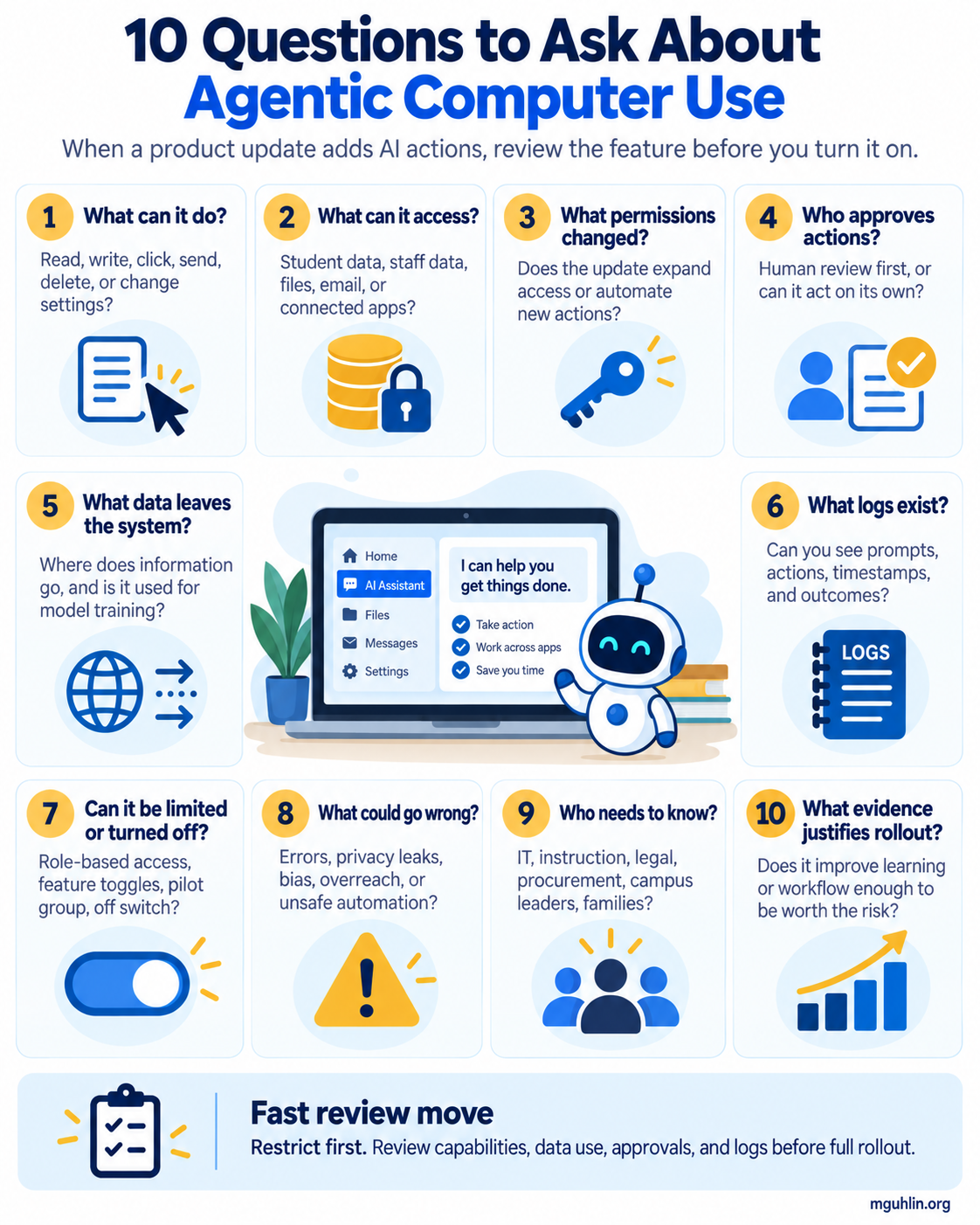
This is the same ten questions from the previous slide, packaged as a reference card your team can print or drop into a procurement checklist. The point of handing it over is to make the review happen without you in the room. When a vendor emails a principal to say they have "streamlined your workflow with a smart assistant," anyone holding this card can ask the four questions that matter first: what can it do, what can it access, who approves its actions, and what logs exist. The fast review move at the bottom is the posture to keep — restrict first, then review capabilities, data use, approvals, and logs before a full rollout.
Make improvement a routine.
Five actions, one accountable owner, clear evidence.
Quarterly learning reviews; immediate escalation for material changes.
Here is the practical routine I would recommend. Identify a real problem or a new risk. Authorize an appropriately bounded experiment if it is safe and useful. Evaluate outcomes, including instructional value, privacy, workload, accessibility, and cost. Update the operational guidance or change a tool's approval status, then communicate what people need to do. Repeat the process. A quarterly review works as a starting point, but material vendor changes and new risks should not wait until the calendar meeting. Someone needs to own this process, with representatives from instruction, technology, procurement, leadership, and the school community contributing at the right points.
Your vendor just added an AI agent.
It can read student records and prepare parent messages. What happens first?
Discuss: Who decides? Which new evidence would change that decision?
This scenario is meant to turn the frameworks into a leadership decision. An existing vendor has added an agent that can retrieve student records and prepare messages to parents. Option A assumes past approval covers everything, which may ignore changed risk. Option C assumes an entire policy rewrite is necessary. Option B is the strongest first response: keep the new feature restricted while a multidisciplinary team reviews its capabilities, data handling, contractual terms, human approvals, and operational controls. From there the district can approve, limit, or reject it. I would ask participants which office owns that call today and whether their procedures make the answer clear.
Audit. ACE. Assign.
Audit today
Check your top 3 platforms for new, unreviewed AI features. 10 minutes, not a quarter.
ACE this week
Run the ACE protocol on one AI-assisted assignment to test for real understanding.
Assign the gate
Name one person to run the expanded SHINE check on your next vendor pitch.
Open your laptop, not a committee. Specific beats broad — it scales to any district.
I used to end talks like this with soft, broad advice: update a rule, test an idea, name an owner. The trouble is that broad directives actually make the listener do more work. "Update a rule" forces an administrator to mentally catalog every rule, decide which are vulnerable, and figure out the first step alone. So here are three specific moves instead. First, today, audit your top three platforms for newly added, unreviewed AI features. I am not asking for a penetration test; I am handing you a flashlight and pointing at the basement stairs — ten minutes to look for a stealth feature update. Second, this week, run ACE on one AI-assisted assignment to see whether the understanding is really there. Third, assign one person to run the expanded SHINE check — the one with the action approval gate — on your next vendor pitch. Every district, large or rural, has a top three platforms, one assignment, and one next pitch. Specificity does not alienate anyone; it removes the friction of choosing. Keep your values steady, your guidance current, and your educators involved.
Explore the frameworks and guidance.
Open the linked resources when you share the deck online.
Note: Pam Hook's SOLO webpage may currently redirect to maintenance; the framework remains described here for reference.
These links provide the background for the presentation. TCEA's Five Phases helps us assess district readiness; SHINE helps determine whether a tool is suitable; and PROTECT focuses our privacy and safeguard review. Visible Learning MetaX provides research on instructional influences, while SOLO and ACE help us examine student understanding rather than relying on the polish of an artifact. TeachAI offers sample guidance and considerations for existing policy. CoSN's 2026 findings explain the adoption figures used near the beginning. The Pam Hook SOLO page may be in maintenance when people visit, so they may need to use a different source for the taxonomy itself.
Source for this slide: https://www.teachai.org/teachai-ai-guidance-for-schools-toolkit